Refactor Long Method with a Lightweight DAG
Tame complex workflows and simplify testing with the Command design pattern
Reviewing some legacy code lately has given me a headache.
The main issue is one massive function crammed with every piece of logic spread out flat inside it. I have to say, this is what I consider the worst kind of “code smell.”
You might ask, “But this function works fine, so what’s wrong with it?”
If it were a static function with no further iterations needed, that’d be fine. But if this function still requires iterations, or worse, isn’t even stable yet with a bunch of process bugs still needing fixing, then it’s absolutely terrible.
Modifying the flow of a massive function is challenging, whether adding conditional checks or introducing new steps. First, developers must understand every existing process to grasp the context and make changes.
After spending tremendous effort to understand the function and complete the modification, the next problem is how to test it.
If it’s a massive function, I believe its unit tests are likely filled with various mocks. Once part of the logic is modified, the worst-case is that all unit tests fail. Moreover, these failures aren’t due to test scenario issues, but simply because the mocks no longer work.
The book Refactoring also ranks Long Methods very high among code smells.
To sum up, a massive function causes numerous problems. So, are there any effective approaches to mitigate this?
Abstraction
Software development is essentially a series of abstraction processes.
Therefore, the most common approach to solving the Long Method problem is to encapsulate each process node into a sub-method. Through effective naming of these sub-methods, we can more easily understand the original complete workflow.
Each sub-method also facilitates unit testing. By ensuring each sub-method functions correctly, the overall behavior remains correct as long as the flow is accurate.
Abstracting a massive function resolves the first issue: maintainability. New team members can grasp the flow faster and continue development.
However, sub-methods alone cannot solve every problem.
For example, in the following example we break down a complex handle_order into a clear, step-by-step process, making it easy for anyone taking over to understand it.
1 | def handle_order(order_data): |
Now, we want to add a new process, which is when the order amount exceeds 1000, we need to incorporate an approval step.
1 | def handle_order(order_data): |
Looks fine, right?
My first thought is it looks a bit tricky to write tests for.
Let’s write a classic Python test case to demonstrate the underlying logic behind testing.
1 | @patch('orders.sendNotification') |
This test presents several challenges for me.
- An overwhelming number of mocks, making them extremely difficult to manage
- The use of
assert_called_onceto validate logic feels counterintuitive - When if-else conditions multiply, such test cases become highly confusing.
Therefore, simply extracting sub-methods is insufficient for achieving a high level of abstraction.
Where’s the problem?
I believe most software development or refactoring actually stops at the previous step. Then layers upon layers get stacked between sub-methods, and eventually spaghetti code emerges.
Because we haven’t achieved true abstraction.
The purpose of abstraction is not to be vague, but to create a new semantic level in which one can be absolutely precise. — Edsger Dijkstra
We only handled the syntax but not the semantics.
If it were me, I would do it this way.
First, we abstract these tasks to be executed into individual tasks.
So we would have an abstract list (A, B, C, D), which is the ultimate expression of abstraction.
1 | commands = { |
We’ve transformed the entire handle order process into the following two types.
- A -> B -> D
- A -> B -> C -> D
This essentially forms a directed acyclic graph (DAG).
Consequently, our subsequent tasks involve DAG operations, where any workflow modification simply adds a node or an edge. Our validation no longer needs to focus on what each node does; we only need to verify that the DAG matches our expectations.
In other words, we are comparing whether assert(workflow == “A -> B -> C -> D”) holds true under specific conditions.
Command Design Pattern
We have now abstracted the process into a DAG, but this is still insufficient.
For each node, its interface is not standardized, so we cannot treat all nodes equally. Therefore, we need to introduce a common interface for these nodes. In design patterns, there is one that fits this scenario perfectly, called Command.
Since these nodes are essentially operations, using Command also satisfies the semantic requirements.
1 | class OrderProcessingReceiver: |
We consolidated all logic under a single class, OrderProcessingReceiver, to prevent workflow logic from being scattered across multiple locations.
Next, we defined the standard Command interface method execute. With this Command, we can create the operation classes for the four nodes on the DAG, which will later be converted into nodes A, B, C, and D.
DAG Builder
Once we have our operations, we proceed to create the DAG.
First, we need methods to create nodes and edges. In fact, Python 3.9 and later includes a built-in library graphlib that already handles this. We don’t need to reinvent the wheel ourselves.
However, the data structures used by graphlib are a bit ugly, and I’m not particularly comfortable with them.
graph = {
    'A': set(),
    'B': {'A'},
    'C': {'B'},
    'D': {'C'}
}
The DAG generated by the graph above would be A -> B -> C -> D. However, you may notice that this definition reverses the order of the DAG, which I personally find counterintuitive. Therefore, I referenced Airflow’s notation and made some modifications.
1 | class DAGBuilder: |
Within the node, I overrode __rshift__. This is purely to make the edges in the entire DAG resemble Airflow’s style. Using it is essentially syntactic sugar.
By combining our original example with this DAGBuilder, we can now implement a workflow that generates a DAG.
1 | def create_workflow_blueprint(order_data: dict) -> dict: |
At this point, we can abstract the entire process into a unified notation. But we need to execute this workflow, right?
So let’s continue.
DAG Runner
We have previously performed numerous abstractions.
- Abstracting the workflow into a DAG
- Abstracting operations into Commands
Now, we will combine these two to transform this DAG into an executable sequence of Commands.
1 | from graphlib import TopologicalSorter |
This runner doesn’t do anything special. It simply takes the DAG we just generated and our defined commands, feeds them in, and executes them in order using the TopologicalSorter.
The TopologicalSorter correctly extracts the node that should be executed at any given moment based on the DAG’s content, then finds the corresponding operation in the command list and executes it.
Finally, let’s see what handle_order will look like.
1 | def handle_order(order_data): |
Conclusion
From the final handle_order method, we can see that when abstraction is taken to its extreme, the main program contains no “impurities.” All workflow logic is defined in create_workflow_blueprint, while all operations reside in OrderProcessingReceiver.
When writing tests, unit tests only need to focus on the internal implementation of each Command, ensuring each Command is correct. Integration tests become even simpler, requiring only verification that create_workflow_blueprint produces the expected DAG.
For example.
1 | def test_blueprint_for_high_value_order(): |
Compared to our initial test full of mock objects, this test is straightforward and easy to understand, and it’s also easier to maintain. That’s the power of abstraction.
Besides making the process easier to understand and tests easier to write, what other benefits does this kind of abstraction offer?
Of course it does, and plenty of them.
When we abstract each operation, all operations become equivalent to the DAGRunner. This allows us to add more functionality to the DAGRunner. For example, we can make each operation retry-capable. Without this abstraction layer, adding retry functionality would require modifying every sub-method individually.
Moreover, we can even implement rollback using the Command pattern. If you’re familiar with the Command pattern, you’ll notice that besides the required execute interface, we can also introduce a redo method. This allows DAGRunner to perform a sequential rollback after a Command fails.
Furthermore, we can introduce additional parallel processing. Let’s use the following DAG as an example.
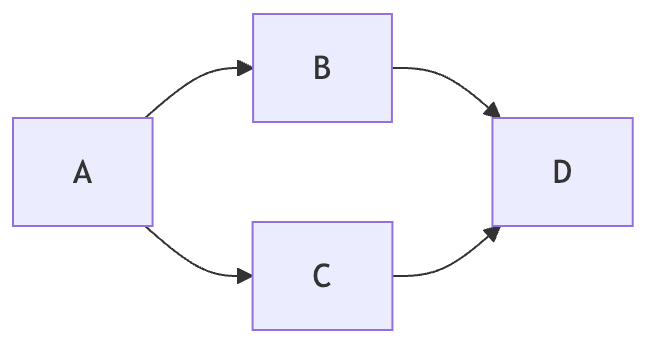
After task A completes, tasks B and C can run concurrently until both finish, at which point task D is processed. This mechanism can also be implemented within DAGRunner.
Since today’s article is already quite large, I can save these follow-up points for the next article if needed.
Let’s call it a day.
A message from our Founder
Hey, Sunil here. I wanted to take a moment to thank you for reading until the end and for being a part of this community.
Did you know that our team run these publications as a volunteer effort to over 3.5m monthly readers? We don’t receive any funding, we do this to support the community. ❤️
If you want to show some love, please take a moment to follow me on LinkedIn, TikTok, Instagram. You can also subscribe to our weekly newsletter.
And before you go, don’t forget to clap and follow the writer️!
Originally published on Medium