Claude Code to Pi: Advanced AI Agent Migration Guide
Master settings.json, MCP, and subagents to bring Claude Code’s power into Pi
In my previous post, I talked about migrating from Claude Code to Pi. Since space was limited, I only covered the basics. In this article, I will explain the specific setup in detail.
First, let’s look at the global configuration layout.
1 | ls -al ~/.pi/agent |
There is a core configuration file in here called settings.json.
1 | { |
This file defines where skills are inherited from and what plugins to install. Pi has very few core components. We need to customize most of it based on our needs. For example, MCP and subagents are the two most critical features, and they both run as plugins.
As we can see from the configuration, we can directly reuse most settings from Claude Code. However, a few interesting details are worth mentioning.
- Pi does not have commands. It only has prompts. In Claude Code, commands are actually just skills with
disable-model-invocableenabled. But in Pi, there are only prompts, which are just plain text. The concept is basically the same, so I linked my commands folder directly to prompts. - I actually use two layers of skills. The first layer is inherited from Claude Code, which is defined in
settings.json. The second layer consists of skills unique to Pi, placed in my Pi skills directory. I had to do this because Claude Code and Pi handle subagent logic are entirely different. Claude Code can spawn a subagent to do work using simple prompts. This approach does not work in Pi, so I had to write them differently. - The MCP configuration is also inherited from Claude Code, but the approach is slightly different. Pi can import settings directly from Claude Code and then override specific variables. I chose to override
idleTimeoutbecause the Pi MCP plugin has an idle timeout setting. This setting makes the Chrome MCP disconnect if it stays idle for a while. Reconnecting Chrome MCP requires manual confirmation every time, so I decided to disable the idle timeout entirely.
1 | { |
Finally, we have APPEND_SYSTEM.md. As I mentioned last time, we can write system prompts in this file if we only want them applied to Pi and not Claude Code.
I defined two core behaviors in this file.
1 | ## Image Reading |
The first one is vision. Since my default model does not support image recognition, I wrote a vision subagent. This allows the main session to ask for help whenever it encounters an image.
The second one is runner. Claude Code has a general-purpose subagent. Whenever the main session wants to do minor tasks, it calls the general-purpose subagent by default. I did something similar in Pi. I wrote a runner subagent so the main session has a helper ready to take over tasks when delegation is needed.
At this point, I have fully migrated Claude Code’s capabilities to Pi. As I mentioned before, I do not need over-the-top features. I only migrated what I considered essential.
Of course, there are still many details to fine-tune after the migration. A good example is the subagent-related skills I just mentioned. In Claude Code, we can create subagents through prompts, but all those skills need to be rewritten for Pi. For Pi, we must clearly define those subagents in the subagents directory.
Even though it is easy to let the agent rewrite them, there are still some minor issues to work out in practice. I kept fine-tuning my Pi-specific skills over time. Overall, the entire migration only took about half a day to a full day.
Promoting My Side Project
When using Pi or Claude Code, I ran into a few persistent pain points.
- When I run multiple agent tasks across many terminal tabs, I need clear notifications. I need to know when a tab is done so I can take over. This is easy to do in Claude Code when using the Warp terminal because Warp has custom features for Claude Code. However, Warp is not going to build custom features for an open-source project like Pi.
- While the subagent extension in Pi is feature-rich, it does not show the execution process. It only shows the final result. Claude Code has Agent Teams, which lets us see the details of each subagent, but Pi lacks this feature.
- Claude Code has several remote control options. These include built-in solutions, which require a personal account and do not support API keys, and third-party options like Happy Coder. However, I have not been able to find a good remote control solution for Pi.
- Warp supports tabs and groups, meaning we can group related sessions together. However, Warp groups do not support collapsing or expanding. When there are too many tabs, it is still hard to find what I need to focus on.
- I need clear labels to know exactly what session is running in each tab. Warp allows us to name tabs and groups, but I still have to name them manually. Doing this for short-lived sessions feels highly inefficient. I believe session names should be generated automatically.
To address these issues, I decided to develop a plugin myself. This is how my side project was born.
It has a few key features.
- It is a web-based service, so there is no need to install any mobile apps. Even though it is a local service, we can easily expose it and set up basic OAuth using tools like ngrok.
- Since it is a web service, it supports parallel work across multiple devices. For example, I can manage session A on my computer browser while handling session B on my phone. We can even control the same session simultaneously from both a phone and a computer without any locking issues.
- It has its own storage unit, so it can save session grouping details. It also supports automatic session naming, though this requires configuring an LLM API key.
- I use this project every single day. I will keep updating and maintaining it regularly. It also has very high test coverage.
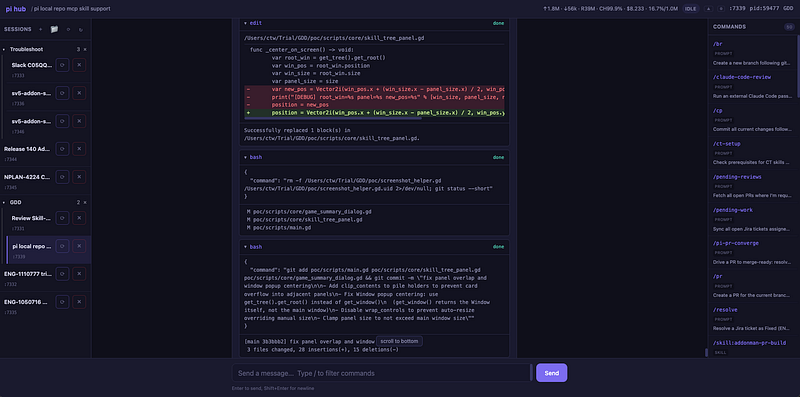
Here is a preview of the main interface. I will add new features over time as I see fit. Contributions are always welcome.
Wrap Up
I have used most GUI and CLI agent tools on the market. Right now, I am most satisfied with Pi. This is not because Pi is perfect or has everything. Quite the opposite, Pi is simple and focuses only on the core, while opening up plenty of APIs for third-party integration.
If we want a specific feature, we can almost always build an extension to solve it. For example, my side project basically gives Pi a full GUI interface, complete with remote control capabilities.
Pi’s stable yet open core is exactly what makes this so easy.
As for model capabilities, whether it is Opus 5, Fable 5, GPT-5.6, or GLM-5.2 (which I mainly use lately), they all have their pros and cons. I will not judge their performance too much here. But without a doubt, GLM-5.2 is currently the most cost-effective option for me.
Originally published on Medium