Optimizing Elasticsearch Reindex without Downtime
Optimizing Elasticsearch Reindex without Downtime
A Guide to achieving zero downtime, high efficiency, and successful migration updates

When using Elasticsearch, there are always times we need to modify the index mapping, and when it happens, we can only do _reindex. In fact, it is a pretty expensive operation because it can take up to several hours to make a complete replication of an index, depending on the amount of data and the amount of shards.
The time spent is not a big problem, but more seriously, it can affect the performance and even the functionality of the production environment.
I believe we all understand that data migration consumes a lot of hard drive resources, it definitely affects performance, but what about functionality?
Let’s take a regular _reindex as an example. Suppose we have created an alias on the index. If we don’t have an alias, we’re in big trouble.
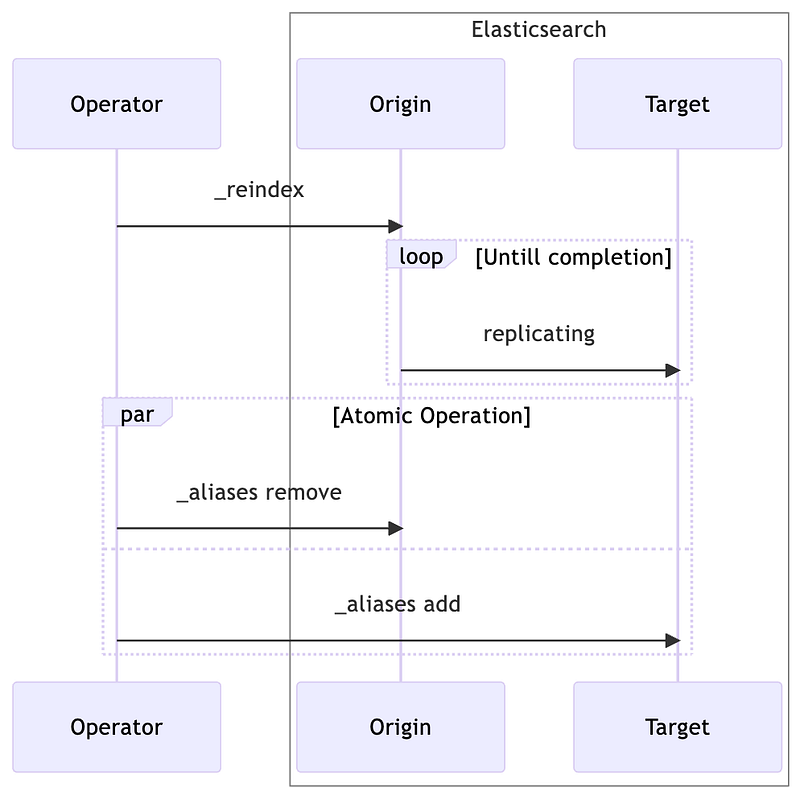
A regular _reindex procedure is divided into two steps.
- Call the
_reindexcommand to start data migration. - When the data migration is complete, call the
_aliasescommand to switch between the old and new indexes.
After step 2, the new index is officially operational, and will be responsible for all read and write requests. However, this is a perfect ideal scenario, in reality, things won’t work out that way.
Here is a normal scenario.
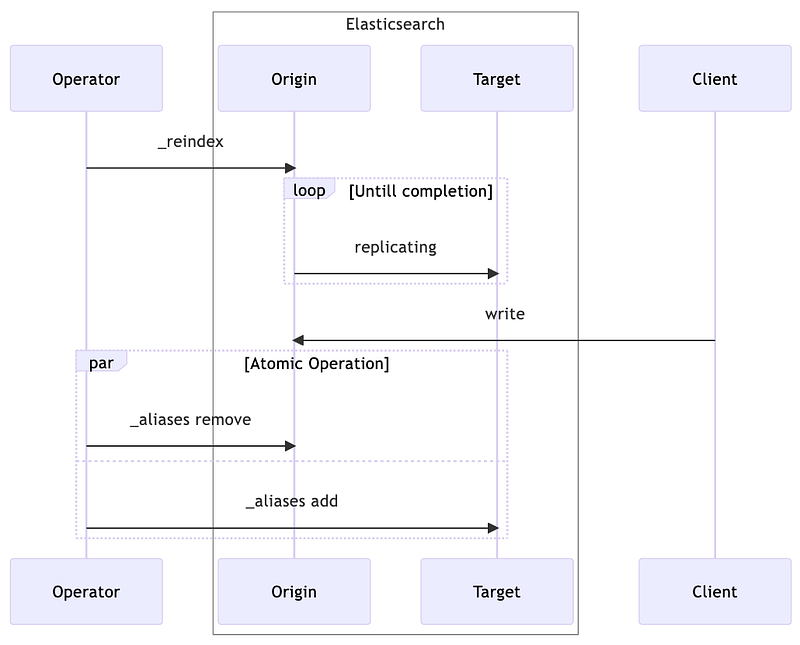
Actually, during the data migration period or before switching aliases, the client will continue to write data to the original index, and these new changes will not be migrated to the new index, which leads to data inconsistency.
For the client, the feeling is that after changing the alias, all the changes just made will disappear. Furthermore, as I just mentioned, a big index migration can take hours, so the client’s feeling must be obvious.
So what to do?
The correct flow of Reindex
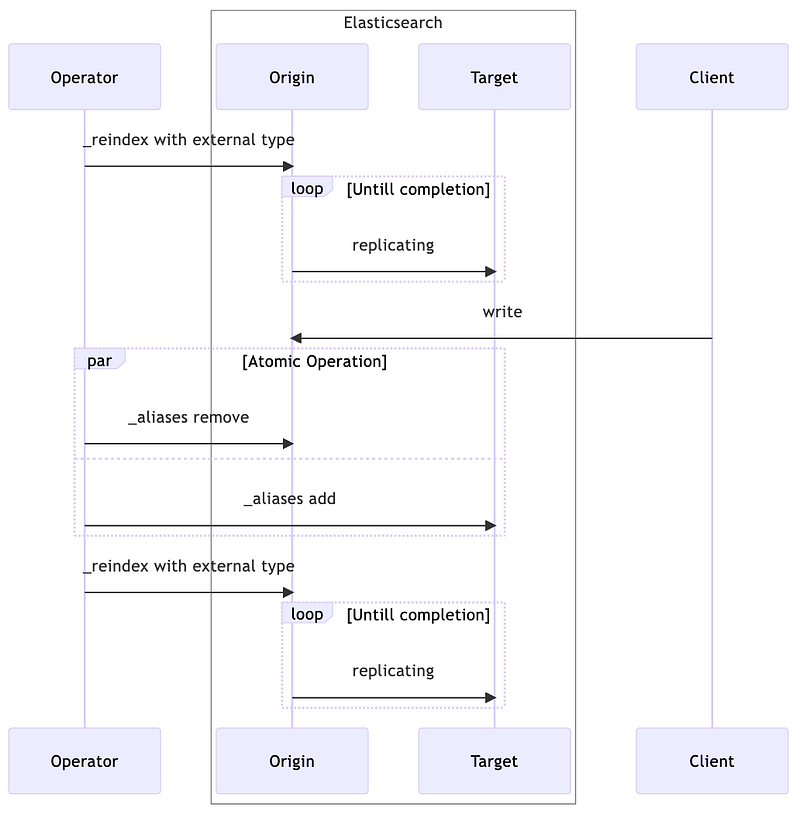
The above flow makes two changes to the original flow.
_reindexmust use external type._reindexis needed again after switching aliases.
Let’s explain the concept of the external type.
By default, _reindex is internal, and such data migration is done by using the original index to overwrite the new index anyway, and dropping the _version of the documents, so all documents in the new index start over.
If using the external type, the _version of the documents will be carried over to the new index during data migration, then the _version will be compared if there is a conflict between the _id of the old and new indexes. Only if the version of the original document is greater than the destination document will be overwritten.
A bit abstract? Let’s take an example.
Let’s say the original index has a document like the following, with Elasticsearch metadata at the beginning of the underscore.
1 | { |
When we do external data migration, _version: 1 is also written to the new index. if someone changes the original document to Hello Search during the data migration period, then the complete document will look like the following.
1 | { |
A redo of _reindex will find 2 > 1, so it will be overwritten with Hello Search.
Then, what if the second _reindex has someone modifying the documents in the new index? For example, if someone changes Hello Elatic to Hello Elasticsearch in the new index, will it be overwritten with the old value? The whole process would look like below.
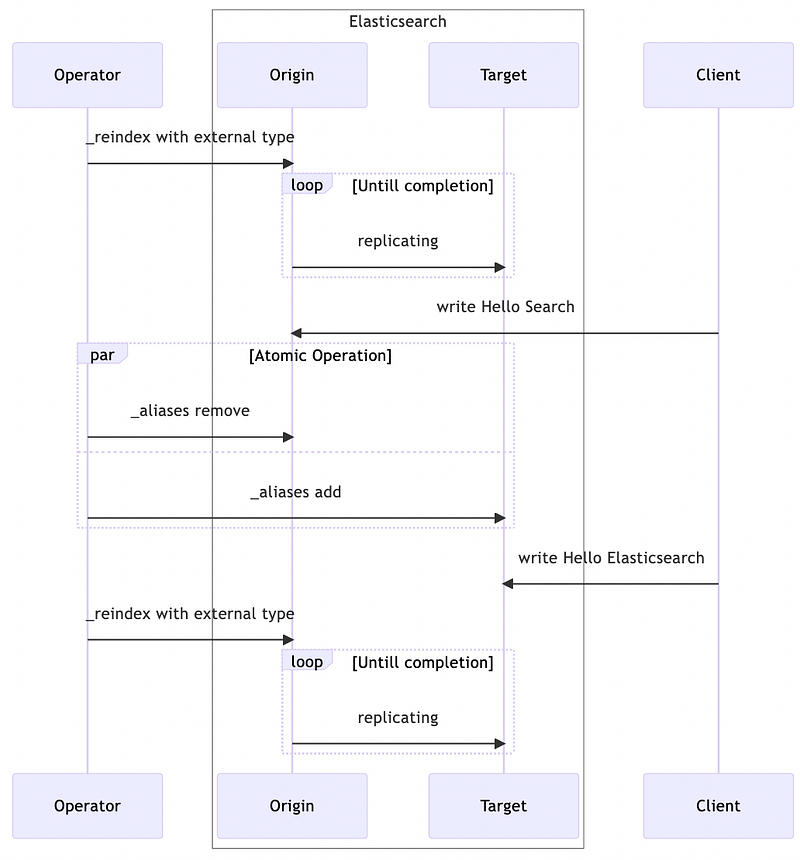
The answer is no, because the original version has to be greater than the new version to be overwritten, if they are equal (both 2) then they are not affected.
One more problem.
Although we will do a second _reindex to patch the data, if the patch time is very long, it will still be inconsistent for the users. There are two ways to shorten the reindexing time.
- Minimize the time of the first
_reindexas much as possible. - Filter the patch data in advance.
Regarding the first point, the _reindex process is controlled by Elasticsearch, what else can we do to improve efficiency? Hey, there is.
We can modify the settings of the new index to minimize the IO overhead during data migration.
refresh_interval = -1number_of_replicas = 0
It’s quite straightforward. First of all, the purpose of turning off refresh_interval is to allow the data migration period to just focus on writing to the Trans log and not spend extra disk IO on Lucene.
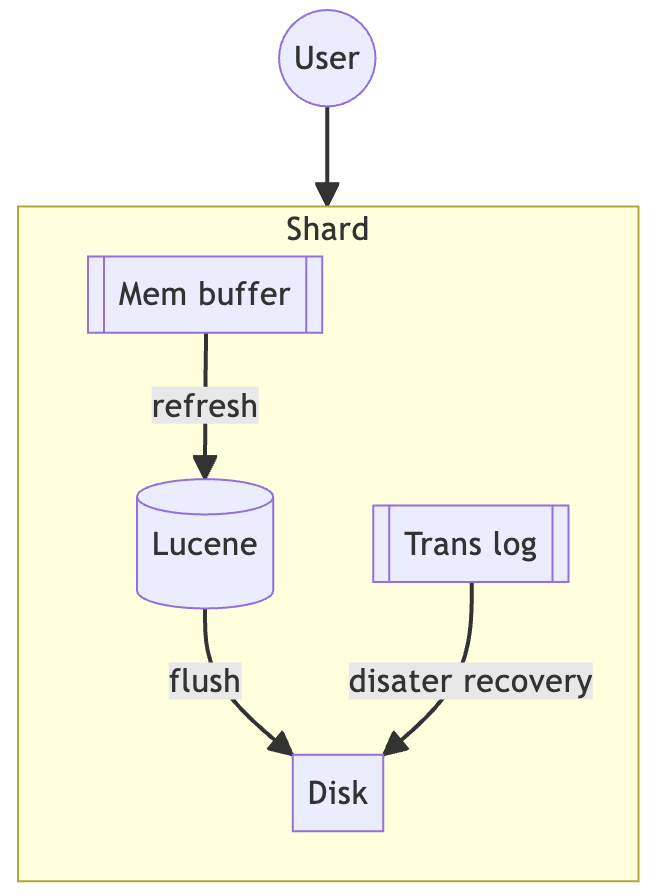
Secondly, turning off number_of_replicas reduces the additional data replication overhead that the cluster has to deal with.
On the other hand, in addition to reducing the time of the first _reindex, some data filtering can be used to reduce the amount of data for the second _reindex.
For example, bringing in the last update time of the data during the _reindex is a possible solution. Assuming that each document has an updated_at field, then adding the following condition to the query of the _reindex would be effective.
1 | { |
Conclusion
Based on the above mentioned details, let’s list out the ideal flow of a reindex.
- Create the destination index.
- Update the settings of the destination index. (
refresh_interval = -1andnumber_of_replicas = 0) - Use external type for
_reindex. - Switch aliases from original index to destination index.
- Do
_reindexagain using external type, preferably with additional filtering. - Update the destination index setting again. (
refresh_interval = nullandnumber_of_replicas = null)
According to the official document, setting to
nullallows to restore the original setting.
Because _reindex is unavoidable, it is important to know how to do _reindex without downtime.
In fact, with Elasticsearch’s streaming index, there are more elegant ways to get it done. However, there are a lot of limitations on the use case for a streaming index, so it’s more common to use a regular index in practice.
This article provides a complete procedure to do _reindex as fast as possible and minimize the time of data inconsistency. However, all of this assumes that the alias is properly created, and if it is not, then more extra steps are required. I feel the lack of aliases is already a violation of Elasticsearch’s best practices, so this article doesn’t specifically cover that scenario.
Stackademic
Thank you for reading until the end. Before you go:
- Please consider clapping and following the writer! 👏
- Follow us on Twitter(X), LinkedIn, and YouTube.
- Visit Stackademic.com to find out more about how we are democratizing free programming education around the world.
Originally published on Medium