Build Free Web Scrapers with GitHub Actions
Build Free Web Scrapers with GitHub Actions
Master cost-free web scraping and automated dashboards using GitHub Actions

In our daily lives, we often encounter scenarios that require cron jobs and lightweight web scrapers. For example, I might need to periodically scrape data from a rental property website. Or I might want to extract statistical data from certain sites to create a report. These are actually simple daily tasks. However, they need a stable and reliable execution environment.
This sounds like a simple need. But it is actually quite hard to achieve without a cloud server or if we want to keep costs at zero. After all, we do not want to leave our own computers running 24/7 just to process extra tasks in the background. Not only does this consume a lot of electricity, but we also have to maintain a constant internet connection. On top of that, we need to store a massive amount of raw data.
So, is there a simple way for us to get a stable and reliable environment to run scripts periodically without spending extra money?
The answer is yes. In fact, I have been doing this a lot lately. The solution is to use GitHub Actions.
The great thing about GitHub Actions is that it provides a reliable runtime environment out of the box. It can continuously use cron jobs to run scripts on a schedule. At the same time, GitHub offers a massive amount of storage space. Most importantly, we do not have to pay anything at all when we use a public repository.
Here is an example. I regularly monitor our team members’ development progress to ensure the entire workflow runs smoothly without any bottlenecks.
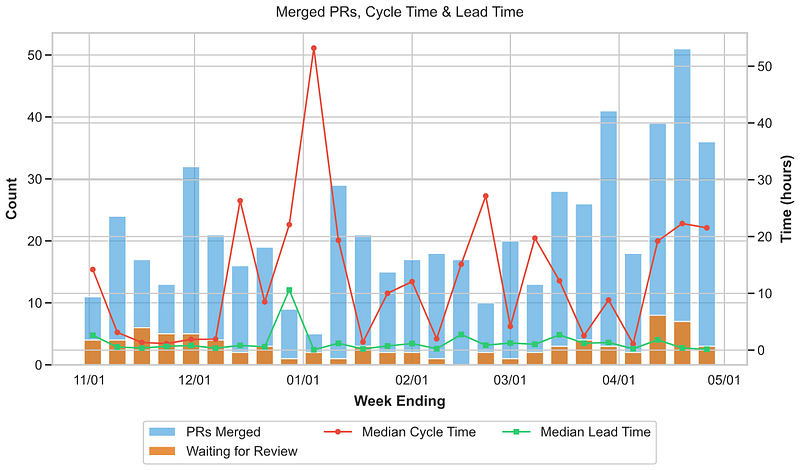
For this specific example, I need a script to continuously scrape GitHub data. I also need to store that raw data. Furthermore, I need a dashboard to display this data and show how the team is operating. We typically use an AWS EC2 instance or a similar cloud server for this kind of requirement. However, I actually accomplished all of this by simply using a single GitHub repository.
The overall architecture looks like the following.
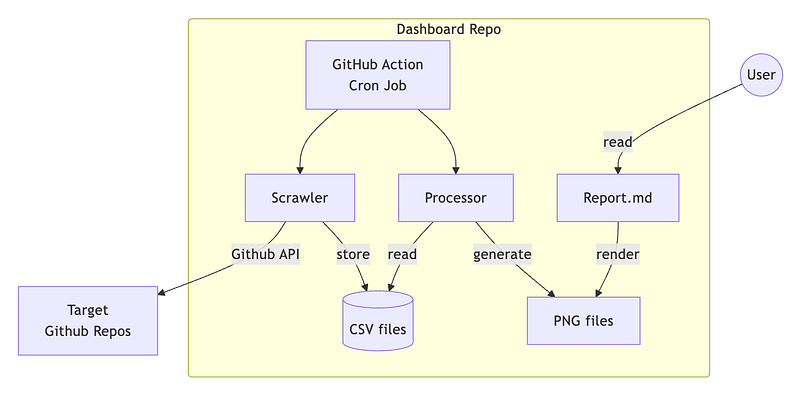
Let us break down the core components first.
- GitHub Actions is the key to everything. It sets the cron rules to trigger the process periodically. Every time it triggers, it first runs the Scrawler to collect the targeted data. In my case, it fetches metrics from another set of GitHub repositories. Then, it saves the data into CSV files. Each CSV file uses the timestamp as its filename. We can also organize them into directories by year if necessary.
- The Scrawler and Processor are relatively straightforward. The Scrawler simply fetches and stores the data. The Processor then converts this raw data into visual charts. I personally prefer using Python’s Matplotlib for this task. It generates various line charts as PNG files and saves them right back into the repository.
- GitHub Actions will automatically commit and push these generated files at the end of its run. This creates a complete and self-sustaining loop.
- How do we present the dashboard? We can prepare a Markdown template in advance to render and display the PNG charts. We just need the Processor to overwrite the exact same set of image files every single time. This makes the dashboard look like it is constantly updating.
We have now built a highly cost-effective scraper. Both the computing resources and the storage are completely free.
GitHub Actions also comes with an added bonus. We can easily rerun the workflow when we encounter an error. This makes debugging very fast. It offers a massive maintainability advantage over a traditional cloud server.
In fact, I have already used this approach to build many scrapers for various purposes. Some examples include internal team dashboards and stock trading trackers. It becomes incredibly easy to mass-produce scrapers for different use cases once we have a solid template. I consider this a nice little bonus from my recent AI side projects.
Originally published on Medium