How to Read Paper Efficiently
From dense theory to runnable code — my AI-powered workflow for decoding research and GitHub repos.

Recently, I was reading a paper, Reinforced Self-play Reasoning with Zero Data, which describes how to train a large language model through reinforcement learning without using human data.
This concept is described in Welcome to the Era of Experience, which states that for an AI agent to be able to exceed human intelligence, it is not enough to rely on human data to learn. The agent must be able to evolve on its own based on the results of its interaction with the environment.
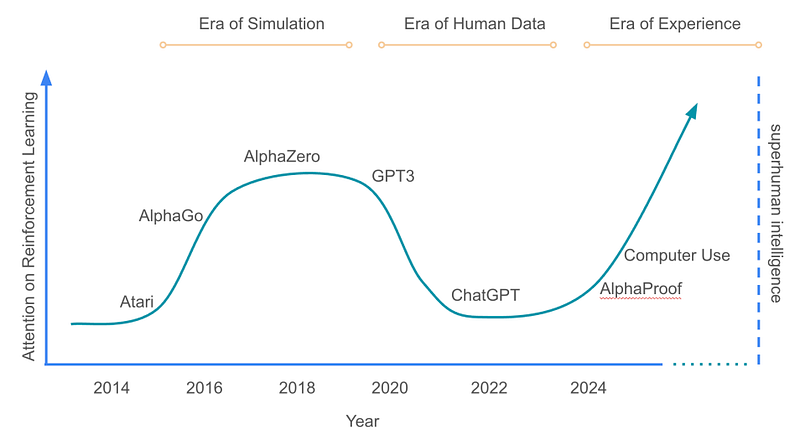
In the past, we have seen that a large part of the improvement in modeling capability comes from human data or human prejudgment.
Human data is better understood as the conversations or formulas that we have prepared in advance to guide the agent to make accurate conclusions. On the other hand, human prejudgment is to tell the agent whether the result is good or bad after the agent has done certain behaviors.
Either way, the AI will only end up doing convergent evolution like humans and will not be able to exceed human capabilities. Therefore, it is necessary for AI agents to have self-learning and self-evolutionary mechanisms in order to break through the ceiling of human beings.
In Absolute Zero, self-learning by interacting with the environment through python code is proposed. The whole process is quite similar to the one I used in my side project of my previous article, where there is a planner, an executor, and a validator, and the agent gives the agent a score.
A major reason to read Absolute Zero is that it has open source, so we can not only read the theory, but also the actual work.
But in this article, I do not want to talk about the details of this paper, but to introduce me now is how to quickly read the paper together with open source projects thoroughly.
The era of AI
After Google I/O 2025, Google released many tools, among which Jules surprised me the most. At the same time, Gemini 2.5 Pro was also officially put into NotebookLM.
NotebookLM is Google’s AI-powered note-taking assistant, which lets you ground conversations in PDFs, notes, or entire research libraries.
Jules is a code analysis assistant that can read and summarize large GitHub repositories.
These two tools are at the core of my ability to read papers efficiently.
First of all, I put the paper body into NotebookLM, because I already have all kinds of papers I have read and studied internally, and even my notes, so NotebookLM can quickly find out the relevance to this paper from my past study records and make a summary of the key points.
Once a summary of the paper is available, it is much easier to go back to the paper. If there is something I don’t understand in the paper, I can talk to NotebookLM to find ideas, and then use Perplexity to find the corresponding key information.
In this way, I will be able to understand most of the paper.
As for the open source project part, I directly fork a project on Github to my own account, feed this forked project to Jules, and let Jules generate the following:
- a list of core components
- component description
- core code flow
- architecture diagram
In this way, I can quickly dive into the core implementation of the paper.
Here is my actual prompt.
1 | ## 📘 English Prompt (for Agent) |
Overall, by using several AI tools to collaborate with each other, I can read papers at least 10x more efficiently than before.
Finally
I am attaching a summary of what I asked Jules to generate this time, and I am sure you will see why productivity has been greatly improved. If I had to do this manually, it would’ve taken hours — now it’s just minutes.
Originally published on Medium