AI Agents for Complex Codebase Analysis
AI Agents for Complex Codebase Analysis
Discover a novel dual-agent method for accurate and deep codebase understanding

Vibe coding has become a major trend lately, with many KOLs claiming they can create and monetize products despite lacking programming skills. Well, I generally respect this approach, since vibe coding excels at greenfield projects, meaning building something from scratch.
As long as the project isn’t overly complex and the requirements are clear, mainstream LLM models can generate decent-quality applications.
However, the real challenge for vibe coding emerges with brownfield projects, where you don’t start from scratch. Instead, you must first establish foundational knowledge and then iterate upon that understanding. This is where vibe coding faces significant difficulties.
This challenge comes from many areas, but the core issue lies in how to comprehend the existing massive codebase.
Therefore, I conducted my own experiments to observe the thought processes of AI agents and attempted to understand their limitations. On one hand, gaining deeper insight into their operations enables more effective utilization. On the other hand, this exploratory journey itself can yield fresh insights.
I’ll try to describe the evolution of this project in a relatively straightforward way, which might also show you how those vibe coding tools work behind the scenes.
The first step, and the most crucial one, is recognition.
In order to let the agent understand the codebase, we first need to know a few things.
- Each LLM call is static, so the agent must be able to decide what to do next based on the results of the previous call.
- As an LLM is a large language model, we must empower it to use tools — whether through the LLM’s built-in function tooling capabilities or by having the LLM generate plans executed by code.
- Since understanding the codebase inevitably requires multiple LLM calls, we must establish strategies, such as where to start and what actions to take. The LLM must also recognize the need to prepare for subsequent rounds.
- Multi-round interactions inherently require termination conditions. These conditions must strike a balance between sufficient generalization and maintaining domain expertise. Generalization prevents exhaustive scenario coverage, while expertise ensures reliable outcomes regardless of context.
- Most importantly, the context window size is finite. We cannot overload it with excessive information at once.
Step 2: Establish an analyzer
With the above understanding, we can proceed to design this agent.
First, we need an analyzer capable of utilizing tools and sustaining multi-round conversations. Additionally, it must incorporate a self-assessment mechanism.
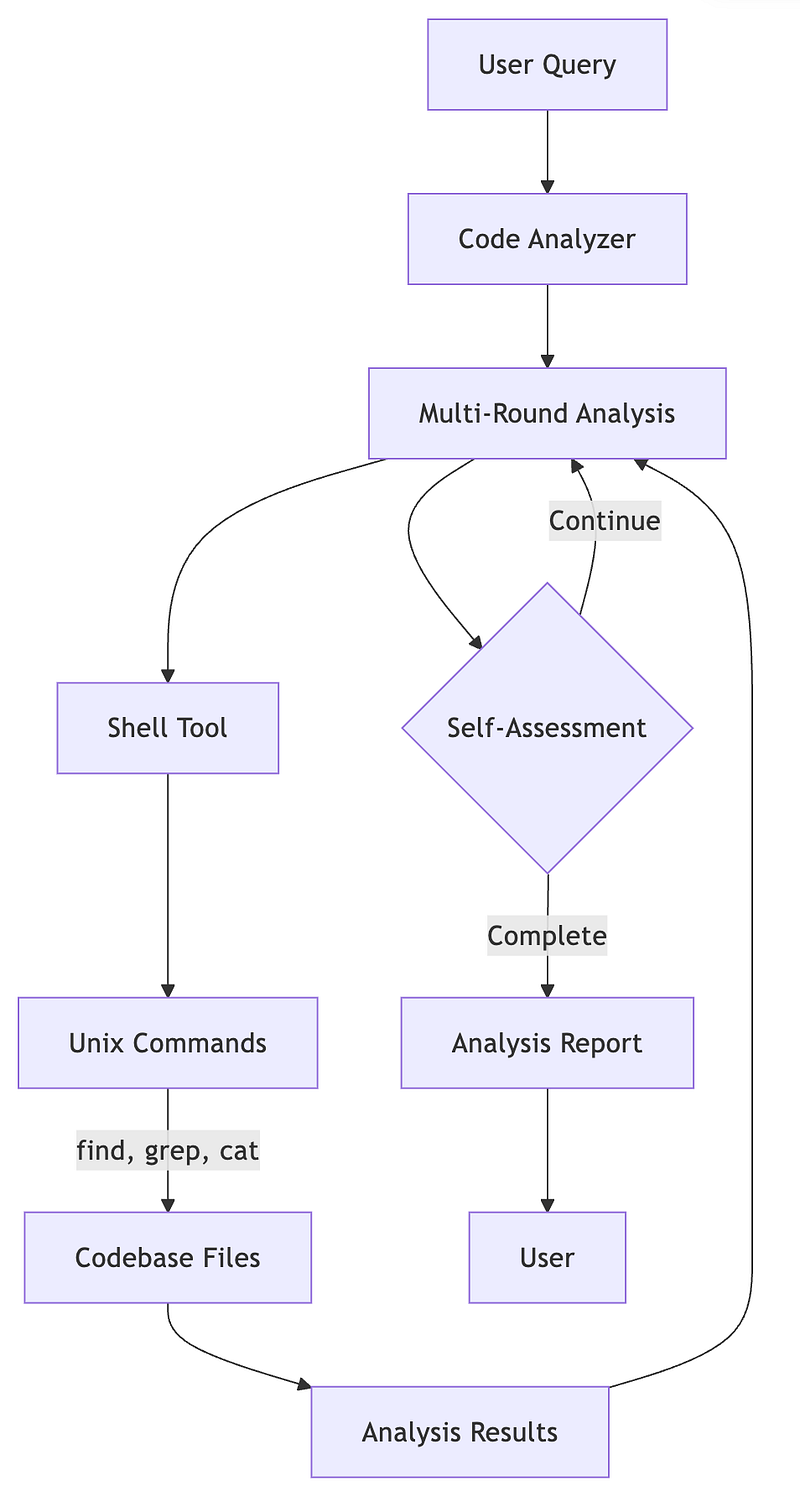
Thus, an agent capable of invoking tools and conducting multi-round conversations is complete.
But this raises a problem: when an agent reviews its own generated reports, might it fall into a state of self-satisfaction? Perhaps it finds the report perfectly satisfactory, yet others actually consider it worthless.
Yes, absolutely.
There are several key reasons.
- Simply teaching an agent to use tools is already difficult.
- Beyond tool usage, teaching an agent to analyze strategies is even more challenging.
- It also requires informing the agent of a reasonable stopping condition.
From the above description, we can see that an agent is tasked with too many responsibilities, leaving it unable to ensure report quality. After all, the quality of a report depends on numerous factors, not merely reviewing the codebase once, but also systematically gathering and organizing the necessary information related to user queries.
Simply put, understanding user intent itself requires a dedicated professional to handle.
Step 3: Establish a gatekeeper
Therefore, we need an external authority to oversee the quality of the entire output.
This authority doesn’t need to use tools or even look at the code. Their role is simply to act as a demanding and nitpicky senior engineer aka a specialist. They possess the expertise of a professional engineer, so they know what’s essential and what’s meaningless.
Through this specialist, we can validate the analyzer’s output, and the specialist will also guide the analyzer on how to proceed more effectively. In other words, the specialist must understand user intent and enrich user queries.
This dual-agent design offers significant scalability because both agents have a single, focused responsibility, resulting in a single, unified interface.
- Analyzer’s interface involves receiving a query and attempting to locate corresponding information across the entire codebase to fulfill that query.
- Specialist’s interface involves receiving a query and a report, then defining the report’s value.
Now, by simply combining these two agents, we can accomplish the challenging task of understanding the codebase.
Project Architecture
The entire project architecture consists of only three core components.
- Code Analyzer: This is the primary agent responsible for executing analysis tasks. It adeptly invokes various shell commands to accomplish its duties. Most importantly, it possesses the ability to continuously explore. It begins by establishing broad strategies and gradually drills down to the core of the problem, relying on its own iterative process.
- Task Specialist: Where there’s somebody working, there must be somebody verifying. Specialist is responsible for validating the analyzer’s results. If the analysis quality is insufficient, it will be rejected and sent back for rework.
- Agent Manager: This role coordinates the entire analyzer and specialist system. It guides the analyzer through its tasks and passes results to the specialist. However, it also enforces termination conditions to prevent the specialist from operating indefinitely.
The entire architecture’s workflow is illustrated in the following flowchart.
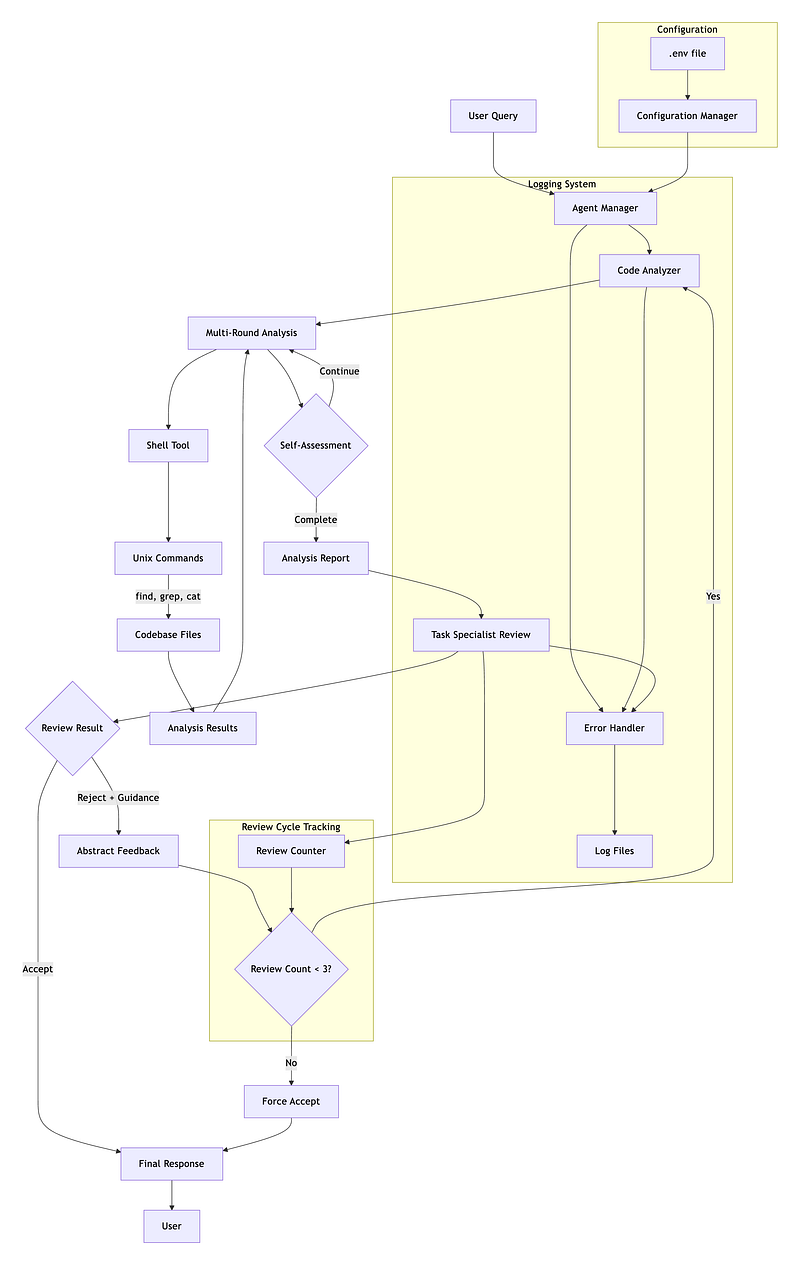
From this diagram, we can observe two distinct cycles.
The first is the analyzer’s self-iteration process. It initiates multiple rounds of conversations, with each subsequent round building upon the previous one to explore unknown areas. This continues until the analyzer’s self-checking mechanism determines the results meet the criteria. Since these criteria are not overly stringent, the analyzer operates autonomously.
The second review, however, is significantly more rigorous, as a specialist engineer examines the report’s quality in detail. If the report is poor, it gets sent back for rewriting, but the specialist will specify what additional content is needed.
This process ensures the final report is perfect. Right?
Prompt Engineering
All the concepts above are correct, and the workflow is fine. But even for such a single-purpose agent, I spent a lot of time tweaking their prompts to make them look like ordinary people.
Yes, ordinary people — far from professionals.
Let me break down the system prompts for this project to understand their respective requirements.
Code Analyzer Prompts
The Analyzer prompt has several key points.
- Key findings: This is the core mechanism for multi-round self-iteration. Each round collaboratively maintains this knowledge base, ensuring the process stays on track throughout iteration.
- Teach the analyzer the multi-round iteration process and how to pass information between rounds.
- The iteration strategy should start with broad classification of project type and language, then identify corresponding classes, methods, and imports for each language.
- Tool usage requires clear guidance: specify what tools are available, what tools are unavailable, and how to use them.
- One crucial point I observed over time: explicitly instruct it on handling varying file sizes. For large files, implement chunk-based reading.
- Finally, clearly define the expected output format and the desired results.
Points 3 and 5 above are, in my opinion, the most easily overlooked details.
The third point involves enhancing the analyzer’s generic capabilities. It needs to be able to adapt while handling various languages, so we can only achieve this by providing fundamental principles as guidance. Here, we deliberately used more general terms instead of Python’s def or Node.js’s function.
The fifth point emerged during its iterative development, where I observed it frequently treating only the first few lines of a file as fully read. This is due to the LLM’s self-imposed limitations. Constrained by window size, the LLM subconsciously takes shortcuts.
When using Kiro, you might have noticed that even with design.md, it still occasionally makes mistakes. That’s because it doesn’t read the entire file. Other tools like Cursor or Copilot exhibit the same behavior.
Therefore, when prompting these vibe coding tools, I deliberately emphasize that they must read the entire file and summarize its key points afterward. This is the most effective way to prevent them from cutting corners.
Task Specialist Prompts
Compared to the analyzer, the specialist’s system prompt is much simpler, requiring only telling it the key points to review.
- Establish a strict persona for them, focused on details and resistant to persuasion.
- At the same time, inform them of the content required in the report, including various details.
- Provide examples to guide their judgment.
Although the core concept is simple, teaching an LLM to refuse requests is truly challenging.
You may have noticed that most models tend to agree rather than disagree due to their training processes. Consequently, every LLM try to be agreeable, leading to many obviously poor-quality reports being allowed to pass.
Even though it only needs to focus on refusal, refusal is exactly the psychological barrier that is the hardest to overcome.
Conclusion
The operational flow of this project has been thoroughly explained above. Through analyzing the entire architecture, I believe everyone can gain a deeper understanding of the underlying principles behind vibe coding. I believe most tools incorporate such a deep iterative process, though each offers distinct customizable prompts and tool sets.
After implementing this project, I finally understood why even a spec-driven development framework like Kiro still fails to solve the problem of agents ignoring designs. The underlying truth is surprisingly simple, and it boils down to the files not being read in their entirety.
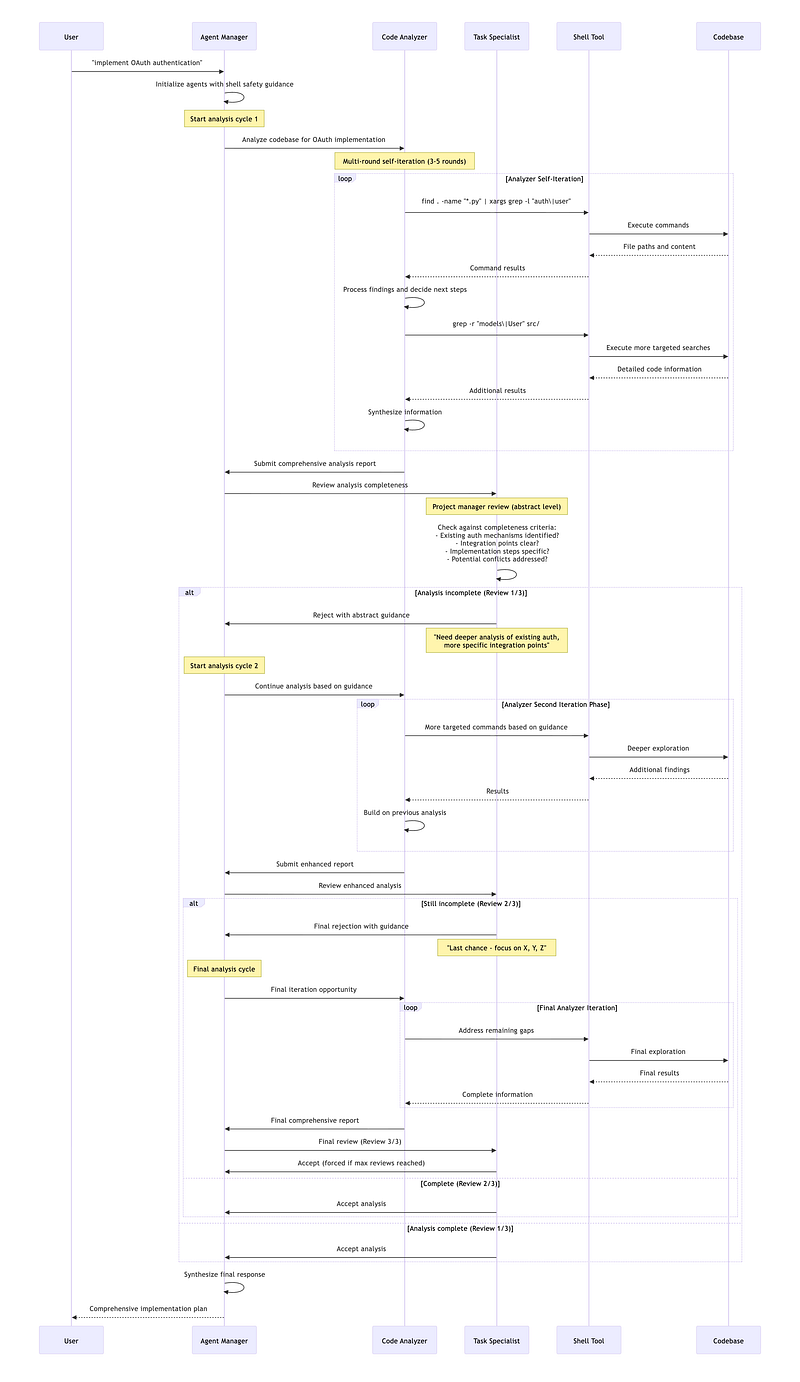
I’ll include a sequence diagram for this project at the end of the article, offering another perspective on how agents comprehend the codebase.
Through this hands-on process, I refined a set of prompts capable of transforming any vibe coding tool into a spec-driven development like Kiro. Today’s story ran a bit long, so let’s continue next time with the series of prompts I distilled. I’ll show you how to enable Copilot to define requirements, design architectures, establish plans, and execute them step by step.
Let’s call it a day.
A message from our Founder
Hey, Sunil here. I wanted to take a moment to thank you for reading until the end and for being a part of this community.
Did you know that our team run these publications as a volunteer effort to over 3.5m monthly readers? We don’t receive any funding, we do this to support the community. ❤️
If you want to show some love, please take a moment to follow me on LinkedIn, TikTok, Instagram. You can also subscribe to our weekly newsletter.
And before you go, don’t forget to clap and follow the writer️!
Originally published on Medium